Dynamically Populate a DataGridView Using Enterprise Library With Values From a Selected Table in SQL Server
This is a quick way to give a user the ability raw look at the data contained in tables in the database linked to your Visual Studio application.
This example uses two SQL Server system tables:
The table below contains all table names in all databases on the instance of SQL Server to which you are connected.
INFORMATION_SCHEMA.TABLES
The table below contains all column names for all tables in all databases on the instance of SQL Server to which you are connected.
INFORMATION_SCHEMA.COLUMNS
This example requires Microsoft Enterprise Library.
Enterprise Library can be downloaded for free from this link:
After installing Enterprise Library do the following:
Click Project on the Visual Studio menu.
Click Add Reference.
Click the Browse tab.
Navigate to the installation path of Enterprise Library.
Most likely it will be installed in your 'Program Files' directory.
Navigate to the bin directory in the Enterprise Library, and select the following dll's:
Microsoft.Practices.EnterpriseLibrary.Common.dll
Microsoft.Practices.EnterpriseLibrary.Data.dll
In order to test this code example, do the following:
Create a new C# project in visual Studio.
Right click on Form1, and click 'View Designer'.
Add a ComboBox to the the form.
Rename the ComboBox, 'cmbTableList'.
Add a button next to the ComboBox.
Rename the button, 'pbView'.
Add a DataGridView Control to the form.
Rename the DataGridView Control, 'dg1'.
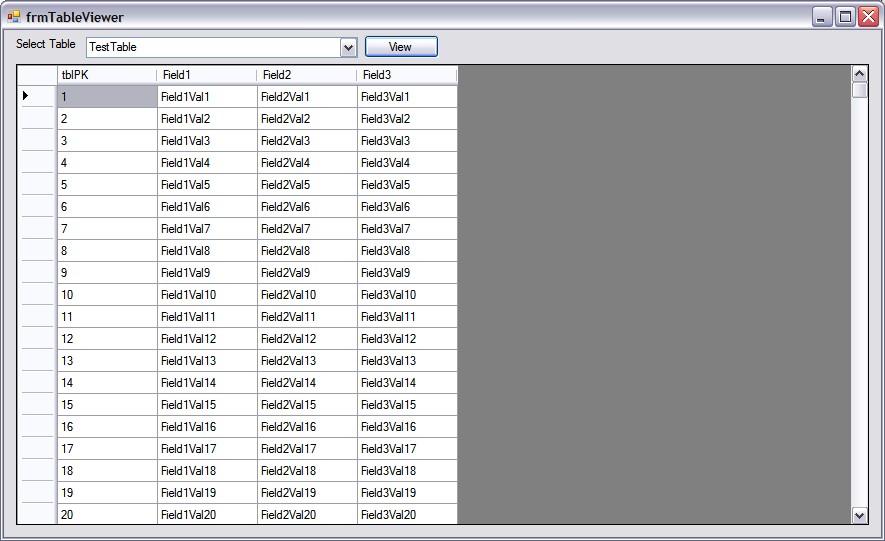
Add the following references to your form:
using
Microsoft.Practices.EnterpriseLibrary.Common;
using
Microsoft.Practices.EnterpriseLibrary.Data;
using
Microsoft.Practices.EnterpriseLibrary.Data.Sql;
using
Microsoft.Practices.EnterpriseLibrary.Data.Configuration;
using
System.Data.Common;
Declare the variables listed below in your form:
In the connection string variable, replace the connection
information with the database information you are going to use.
public partial class Form1 : Form
{
string sConnectionString = "Data
Source=DB_Server;Initial Catalog=DB_Name;Persist Security Info=True;User ID=UserID;Password=password";
string sColumnString = "";
string sTableName = "";
...
Place the code below after the InitializeComponent function
in order to load the table list into the ComboBox.
public Form1()
{
InitializeComponent();
GetTableList(); //Get a list of
tables and populate the table list ComboBox.
dg1.AllowUserToAddRows = false;
//Since you will manually populate the DataGridView, you must set the AllowUserToAddRows
property to false.
}
Copy and paste the code below in order to populate the
DataGridView button after selecting a table from the list and clicking the
'View' button.
private void pbView_Click(object
sender, EventArgs e)
{
sTableName = cmbTableList.Text;
GetColumnList();
GetTableValues();
}
void GetTableList()
{
string sSql1 = "";
cmbTableList.Items.Clear();
Database db = new
SqlDatabase(sConnectionString);
//The table list in SQL Server is
contained in the system table, 'INFORMATION_SCHEMA.TABLES'
//The names of the tables are contained in the TABLE_NAME
field.
sSql1 = "SELECT TABLE_NAME " +
"FROM INFORMATION_SCHEMA.TABLES " +
"WHERE (TABLE_CATALOG = 'RCS_DEV') " + //For TABLE_CATALOG, use the name of your
database
"AND (TABLE_TYPE =
'BASE TABLE') " + //Using 'BASE
TABLE' excludes all system tables from your list
"ORDER BY
TABLE_NAME";
DbCommand objCMD =
db.GetSqlStringCommand(sSql1);
IDataReader objDataReader =
db.ExecuteReader(objCMD);
while (objDataReader.Read())
{
cmbTableList.Items.Add(objDataReader[0].ToString());
}
objDataReader.Close();
}
void GetColumnList()
{
string sSql2 = "";
sColumnString = "";
dg1.Columns.Clear();
Database db = new
SqlDatabase(sConnectionString);
//DbCommand objCMD = db.GetStoredProcCommand("usp_RCS_GetTableFields");
//Table COLUMN Names are stored in
the INFORMATION_SCHEMA.COLUMNS table in the COLUMN_NAME field.
sSql2 = "SELECT COLUMN_NAME, TABLE_NAME " +
"FROM INFORMATION_SCHEMA.COLUMNS " +
"WHERE (TABLE_NAME = '" + cmbTableList.Text
+ "') AND (TABLE_CATALOG = 'RCS_DEV')";
DbCommand objCMD =
db.GetSqlStringCommand(sSql2);
IDataReader objDataReader =
db.ExecuteReader(objCMD);
//A string of field names from the
selected table is crated in order to build a
//select statement to return
values from the selected table.
while (objDataReader.Read())
{
dg1.Columns.Add(System.Convert.ToString(objDataReader[0].ToString()),
System.Convert.ToString(objDataReader[0].ToString()));
dg1.Columns[dg1.Columns.Count
- 1].SortMode = System.Windows.Forms.DataGridViewColumnSortMode.NotSortable;
sColumnString = sColumnString
+ System.Convert.ToString(objDataReader[0].ToString()) + ", ";
}
sColumnString =
sColumnString.Substring(0, sColumnString.Length - 2);
objDataReader.Close();
}
void GetTableValues()
{
dg1.Rows.Clear();
Database db = new
SqlDatabase(sConnectionString);
DbCommand objCMD =
db.GetSqlStringCommand("select " + sColumnString + " from "
+ sTableName);
IDataReader objDataReader =
db.ExecuteReader(objCMD);
while (objDataReader.Read())
{
dg1.Rows.Add();
for (int i = 0; i <=
objDataReader.FieldCount - 1; i++)
{
dg1.Rows[dg1.Rows.Count -
1].Cells[i].Value = objDataReader[i].ToString();
}
}
objDataReader.Close();
}
